Announcement

Collapse
No announcement yet.

server busy

Collapse
X
 
  • Filter
  • Time
  • Show
Clear All
new posts

  • server busy

    Got the Phoenix package today and loaded it up all good but won't let me update to version 5.5j. Says 'server is busy please try later'. Been trying for hours! Also, I'm using the Blade 200 srx tx LP6DSM. Managed to calibrate but it appears to be in pro mode rather than beginner. How do I set the tx up so I have all functions?

    Thanks
    Vinnie

  • #2
    Okay, just done a disc clean up and I've managed to do the updates! Hurray!!!
    Can anyone help me with the tx?
    Last edited by Vanq; 14-01-2016, 11:10 PM.

    Comment


    • #3
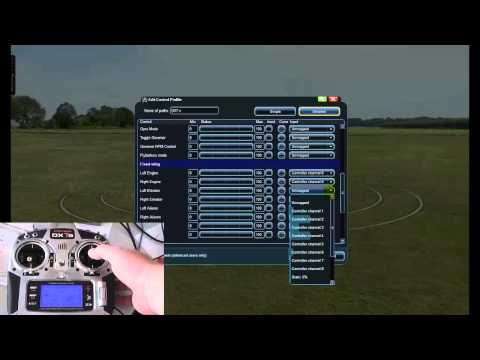
      I'm not familiar with the Tx but if you go system, your controls and the edit profile you should see a detailed section on the channels. Click on the function you want and in the mapping area at the end of the line see what channel is being operated for that function. You won't get everything though as it's just looking at the channels and some of the things your looking for are functions. You may be able to assign different switches etc with different functions in the Tx but it starts getting a bit pointless. As long as idle up works and hold then you're good to go
      Humble owner of 7 Eddie Gold Stars and Ex - member of Mk Heli Club
      sigpic

      Comment


      • #4
        Originally posted by waveydavey View Post
        I'm not familiar with the Tx but if you go system, your controls and the edit profile you should see a detailed section on the channels. Click on the function you want and in the mapping area at the end of the line see what channel is being operated for that function. You won't get everything though as it's just looking at the channels and some of the things your looking for are functions. You may be able to assign different switches etc with different functions in the Tx but it starts getting a bit pointless. As long as idle up works and hold then you're good to go
        Thanks. In the menu I can see the bar graph. For the 3 settings beginner, intermediate and advanced I can see it's channel 5 When the switch is in 0 for beginner and I switch to 1 the bar doesn't move in channel 5. From 1 to 2 the bar moves up to the top. In edit, advance settings, I don't see a bar move.

        Comment


        • #5
          Take a look at this vid and see if it makes sense, different Tx but the principle is the same

          Humble owner of 7 Eddie Gold Stars and Ex - member of Mk Heli Club
          sigpic

          Comment


          • #6
            That worked. Thanks! I thought I was using the Blade 200 SRX, I wasn't I was using the Blade SR. I've just downloaded the SRX but it launches itself into the sky! A little pop up box says its in auto pilot mode? Tried going into settings to change it but can't seem to see what's going on. If I change to a different heli, all is fine.

            Comment

            Working...
            X