Announcement

Collapse
No announcement yet.

mcpx v2 help please!

Collapse
X
 
  • Filter
  • Time
  • Show
Clear All
new posts

  • mcpx v2 help please!

    Hi Guys,

    Got my new mcpx v2 yesterday and have some problems.

    I brought the BNF version and have a new Dx6i. I then followed 'Finless Bobs beginner set up. All switches set to 0, have not bothered with the 1 setting yet,so I presume its just factory settings at the moment.
    I then watched many Youtube Videos and bound them together,all good.

    I have the idle up switch off so more beginner friendly too.F mode on that switch means Idle up is on and when the switch is switched to Gear this means idle off and your in normal/beginner mode?

    I had the battery fully charged,switch off the throttle hold switch and eased on the throttle,I went up to full throttle and it never left the ground! Seems as though there was a lack of power?

    I then decided to try to take of with the f mode switch on,idle up right?

    All set in idle up mode I then took the throttle hold switch off.With the throttle lever FULLY DOWN the motor start to run on their own????

    I have watched every set up video going, I must be as thick as a plank Lads, I'm at a loss.

    Any help very much appreciated

  • #2
    You are NOT as thick as planks. You bought an Mcpx to learn on and that is a great start.

    Use the setup on the Mcpx instuctions for the DX6i as a start. They are in the Mcpx manual.
    Last edited by David Drew; 31-12-2013, 07:31 PM.
    Happy Landings.
    David

    Winner of SEVEN of the BEST (Eddie Gold Stars)...humbled!

    Raptor 50. OS50
    Century Bell 47G in Yellow - Beautiful!
    Mcpx
    Blade 130x
    Goblin 500

    Comment


    • #3
      +1 on the above the mcpx settings in the manual are too begin with

      Sent from my Nexus 4 using Tapatalk

      Comment


      • #4
        Also check the settings carefully, DON'T take my word for it check check and check but I believe you may have to reverse the pitch in the reverse settings, as I say again check with the manual

        Sent from my Nexus 4 using Tapatalk

        Comment


        • #5
          You need to reverse the blade pitch channel - I did (or didn't, depending on your point of view) the same when I got mine. Take another look in the manual, it will be there somewhere ;-)

          Sent from my GT-N7105 using Tapatalk
          Blade mCPx V2
          Align T-Rex 550E FL (Talon 90, Align 3GX, AR6210)
          DX6i
          Phoenix Sim
          Basildon RC Helis - http://basildonrchelis.rcha-uk.com/

          Comment


          • #6
            I posted on someone elses thread a week or so ago about something similar, BNF can be very misleading, you kind of assume you take it out of box, charge it up, assign a slot in the tranny and off you go. In fact you have to undergo a barrage of new jargon in a frustrating process that seems to want to keep you on the ground! I'd say go through the manual step by step, don't skip bits, then go over it again, it's all in there, you just need to decipher it all. Finless has some great setup vids, use them to get your head round anything not clear in the manual. Other than that, make sure model is set to heli, blades are flat at mid stick, everything is tight (not mental tight!) head/swash reacts correctly to stick input ie reverse servo direction if needed, check pitch and throttle curves etc and good luck
            Last edited by parksy; 31-12-2013, 07:50 PM.

            Comment


            • #7
              Originally posted by smw5767 View Post

              All set in idle up mode I then took the throttle hold switch off.With the throttle lever FULLY DOWN the motor start to run on their own????
              All the idle up switch does is select a different throttle curve. The default settings in the MCPx manual have a linear throttle curve in normal mode, so as you lift the throttle stick the throttle % increases and a flat 100% for all points when the idle up switch is on, so the motor will spin flat out even with the throttle stick all the way down as you found out

              Comment


              • #8
                Cheers Lads,
                I'll start over and go through the manual again.

                Comment


                • #9
                  Originally posted by smw5767 View Post
                  Cheers Lads,
                  I'll start over and go through the manual again.
                  Exactly. You will change the settings but only after experience of flying it.
                  Happy Landings.
                  David

                  Winner of SEVEN of the BEST (Eddie Gold Stars)...humbled!

                  Raptor 50. OS50
                  Century Bell 47G in Yellow - Beautiful!
                  Mcpx
                  Blade 130x
                  Goblin 500

                  Comment


                  • #10
                    Even when you got it setup right make sure you got plenty of room and put the heli down flat asap so it can initialise level

                    Sent from my Nexus 4 using Tapatalk

                    Comment


                    • #11
                      It may be as simple as you need to check the main gear is pushed all the way on as its a common problem the mcpx... if you still cant work it out post a vid on here and you will get the answer fairly quickly

                      Sent from my GT-I9505 using Tapatalk
                      Charles - Align 500EFL Pro - Blade 130x - Blade mCPx v2 - Spektrum DX6i & Phoenix Sim

                      Comment


                      • #12
                        Cheers Lads,
                        I did manage to find the Reverse settings in the Dx6i, Pitch was set to 'N' so I changed that to 'R',
                        all the rest are left on 'N'.

                        Comment


                        • #13
                          Originally posted by smw5767 View Post
                          ...

                          I brought the BNF version and have a new Dx6i. I then followed 'Finless Bobs beginner set up. All switches set to 0, have not bothered with the 1 setting yet,so I presume its just factory settings at the moment.
                          There are no such things as factory settings. You need to setup the DX6i as per the MCPXv2 manual. This defines the throttle and pitch curves for normal and idle up for the mcpx into the radio.

                          I have the idle up switch off so more beginner friendly too.F mode on that switch means Idle up is on and when the switch is switched to Gear this means idle off and your in normal/beginner mode?
                          The idle-up switch just switches to another throttle curve in the radio. Typically however, the idle-up curve is full throttle regardless of stick position - ie. the motor on all the time.
                          I had the battery fully charged,switch off the throttle hold switch and eased on the throttle,I went up to full throttle and it never left the ground! Seems as though there was a lack of power?
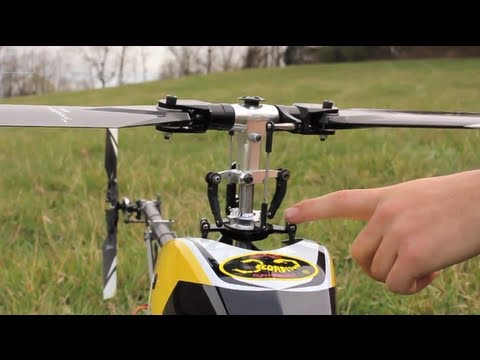
                          Turn ON throttle hold and move the left stick up and down. Watch what happens to the blades. You should find that they go from negative pitch (leading edge pointing down) to positive pitch (leading edge pointing upwards) as you move the stick up. If that doesn't happen, that's your problem.
                          I then decided to try to take of with the f mode switch on,idle up right?

                          All set in idle up mode I then took the throttle hold switch off.With the throttle lever FULLY DOWN the motor start to run on their own????
                          Yup - see above.
                          I have watched every set up video going, I must be as thick as a plank Lads, I'm at a loss.

                          Any help very much appreciated
                          Nope - you've just started one of the most complicated hobbies going! It's a steep learning curve at the start. But like I say, with throttle hold on, ensure that as you move the left stick up, the blade pitch changes to positive. Try watching ...

                          Tom
                          sigpic Synergy E7SE - Kontronic Helijive 120+ ESC, vBar Neo
                          SAB Goblin 630 Competition
                          - Castle Edge 120HV, vBar Neo
                          Blade 700X - Castle Edge 160HV ESC, Mini vBar
                          Logo 550SXv2 - Castle 130LV ESC, vBar Neo
                          .... and a Gaui X3
                          Spektrum DX8 ; Mikado VBC ; RealFlight 7 & neXt sims
                          ... and two EGS'


                          Comment


                          • #14
                            Hi Tom,

                            Thank you so much for the info,really helpful.Your right, it is a massive learning curve but I'm loving every minute of it for sure!
                            I think I've kind of 'Climbed the ladder' the right way to get to CP Hel's, first was my Syma SO 32, Honeybee v2 [hideous thing]
                            then Phoenix practice, now my great little mcpx v2. [wanted one for ages]
                            I have patience too!
                            Great video by the way Tom,
                            Many Thanks and happy New year to you.

                            Comment


                            • #15
                              No problem! It's worth watching the entire playlist of Destin's videos on helicopters. When I started, I absolutely loved them!

                              Smarter Every Day DEEP DIVE #1 - Helicopters Physics! - YouTube
                              Tom
                              sigpic Synergy E7SE - Kontronic Helijive 120+ ESC, vBar Neo
                              SAB Goblin 630 Competition
                              - Castle Edge 120HV, vBar Neo
                              Blade 700X - Castle Edge 160HV ESC, Mini vBar
                              Logo 550SXv2 - Castle 130LV ESC, vBar Neo
                              .... and a Gaui X3
                              Spektrum DX8 ; Mikado VBC ; RealFlight 7 & neXt sims
                              ... and two EGS'


                              Comment

                              Working...
                              X